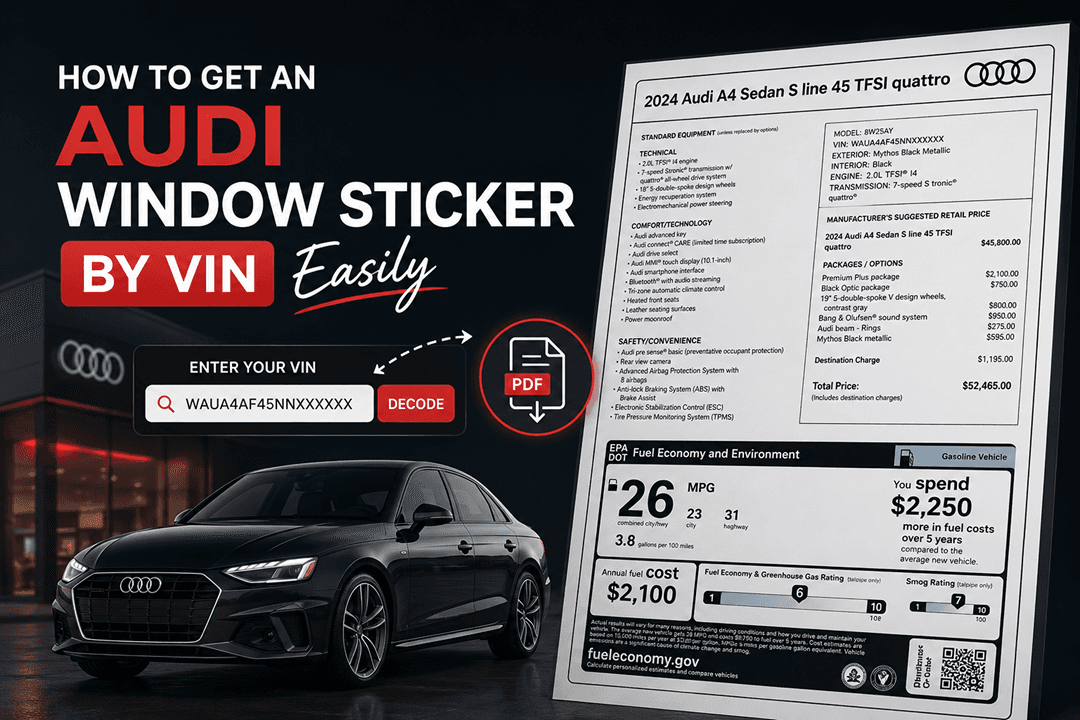

If you have a plan to purchase a used Audi or have lost the original window sticker, you might want to try getting the original copy of the Audi window sticker generated from the VIN.
These services promise to deliver the original factory specifications, including MSRP, optional equipment, and fuel economy ratings—all from your 17-digit VIN.
But how accurate are these generated window stickers? Can you trust them to verify factory options, determine a vehicle’s true value, or settle an insurance claim? Find the answer in this article.
What is a VIN-Generated Window Sticker?
A VIN-generated window sticker—also known as a recreated window sticker or digital Monroney label—is a replica of the original factory window sticker produced by entering a vehicle’s 17-digit VIN into a database that accesses manufacturer build records.
Characteristics
The generated window sticker has no content different from the original window sticker. On the other hand, the layout might be slightly different because different service has their own layout to distinguish from other window sticky VIN tools.
Digital Replica
The generated sticker is designed to mirror the original Monroney label in both content and format. It displays:
- Base price and optional equipment with individual costs.
- Total MSRP including destination charge.
- Standard features and safety equipment.
- EPA fuel economy ratings.
- Vehicle specifications (engine, transmission, drivetrain).
VIN-Specific
Each generated sticker is unique to that VIN. The information displayed is pulled from factory build records associated with that specific vehicle identification number.
On-Demand Availability
Unlike the original window sticker—which was affixed to the vehicle at the time of sale and is often lost—a VIN-generated sticker can be obtained instantly through online services like the Audi window sticker.
How VIN-Generated Window Stickers Are Created
VIN-generated window stickers are created by pulling data from factory build records linked to the vehicle’s VIN. These records contain original specifications, pricing, and options, forming the basis for recreating a sticker that closely reflects the vehicle’s original configuration.
Data Source: Factory Build Records
The accuracy of a VIN-generated window sticker depends entirely on the source of the data. Reputable services access manufacturer factory build records—the same databases used by Audi dealerships and corporate systems.
What Factory Build Records Contain
- Original MSRP: Base price, optional equipment costs, destination charge.
- Factory-Installed Options: Every package and individual option is installed at the factory.
- Port-Installed Accessories: Items added at the port of entry before dealership delivery.
- Standard Equipment: Features included with the base trim level.
- Vehicle Specifications: Engine, transmission, drivetrain, exterior color, interior trim.
- EPA Fuel Economy: Official estimates for that specific drivetrain.
The Process
Curious how our service is able to generate the Audi window sticker by VIN. Pay attention to the section below to get an understanding of how a window sticker can be replicated from the VIN.
| Step | Description |
|---|---|
| VIN Entry | User enters the 17-character VIN into the service |
| VIN Validation | System verifies the VIN format |
| Data Retrieval | Factory build records are accessed using the VIN |
| Sticker Generation | Data is formatted into the standard Monroney label layout |
| Delivery | Digital sticker is delivered as a PDF for download or printing |
← Scroll horizontally to see more →
Data Source Matters
A window sticker generated from direct manufacturer factory data is highly accurate. Services that rely on aggregated or user-submitted data may produce incomplete or incorrect results.
| Data Source | Accuracy Level | Examples |
|---|---|---|
| Manufacturer Factory Database | 100% accurate to the original build | Audi AG records, dealer systems |
| User-Submitted Data | Unreliable | Crowdsourced or forum-based decoders |
← Scroll horizontally to see more →
Accuracy Assessment: What’s Accurate and What’s Not
Accuracy can vary depending on the data source, but many details on a VIN-generated window sticker are highly reliable when pulled from official factory records. These typically reflect the vehicle’s original build and specifications with strong consistency.
Highly Accurate Information
The following information from a VIN-generated window sticker is highly accurate when sourced from the manufacturer's factory records:
| Information Type | Accuracy | Notes |
|---|---|---|
| VIN | 100% | Matches the entered VIN |
| Model Year | 100% | Derived from VIN character 10 |
| Trim Level | 100% | Premium, Premium Plus, Prestige |
| Engine Type | 100% | 2.0T, 3.0T, 4.0T, etc. |
| Drivetrain | 100% | Quattro AWD or front-wheel drive |
| Factory Packages | 100% | Prestige Package, S line Sport Package, etc. |
| Individual Factory Options | 100% | Bang & Olufsen sound, adaptive air suspension, etc. |
| MSRP (Base Price) | 100% | Original base price for that trim |
| MSRP (Options) | 100% | Itemized costs for each option |
| Destination Charge | 100% | Original shipping fee |
| Fuel Economy | 100% | EPA estimates for that drivetrain |
← Scroll horizontally to see more →
Information Not Included
Even the most accurate VIN-generated window sticker will not include:
| Information Type | Why It’s Not Included |
|---|---|
| Dealer-Installed Accessories | Added after the vehicle left the factory; not in build records |
| Aftermarket Modifications | Installed by owners; not part of factory data |
| Service History | Not part of factory build records |
| Accident History | Not part of factory build records |
| Current Mileage | Not part of factory build records |
| Ownership History | Not part of factory build records |
| Dealer Markup or Discounts | Negotiated at time of sale; not factory data |
← Scroll horizontally to see more →
Potential Accuracy Issues
While factory-sourced data is highly accurate, there are scenarios where discrepancies may occur:
VIN Entry Errors
The most common source of error is incorrect VIN entry. A single mistyped character can result in:
- A window sticker for a completely different vehicle.
- An error message indicating the VIN is not found.
Solution: Double-check the VIN from multiple locations (dashboard, door jamb, registration) before entering.
Model Year Transition
Vehicles manufactured during model year transition periods (late summer to early fall) may have inconsistencies if:
- The VIN indicates one model year, but the vehicle was built with early/late features.
- Factory records reflect the official model year per VIN standards.
Solution: Reputable services align with official VIN standards; discrepancies are rare.
Limited Production or Pre-1981 Vehicles
Vehicles manufactured before 1981 used non-standardized VIN formats (often 13 characters or less). Factory records for these vehicles may:
- Not be digitized
- Be incomplete
- Does not support modern window sticker generation
Solution: VIN-generated window stickers are typically available only for 1981 and newer models.
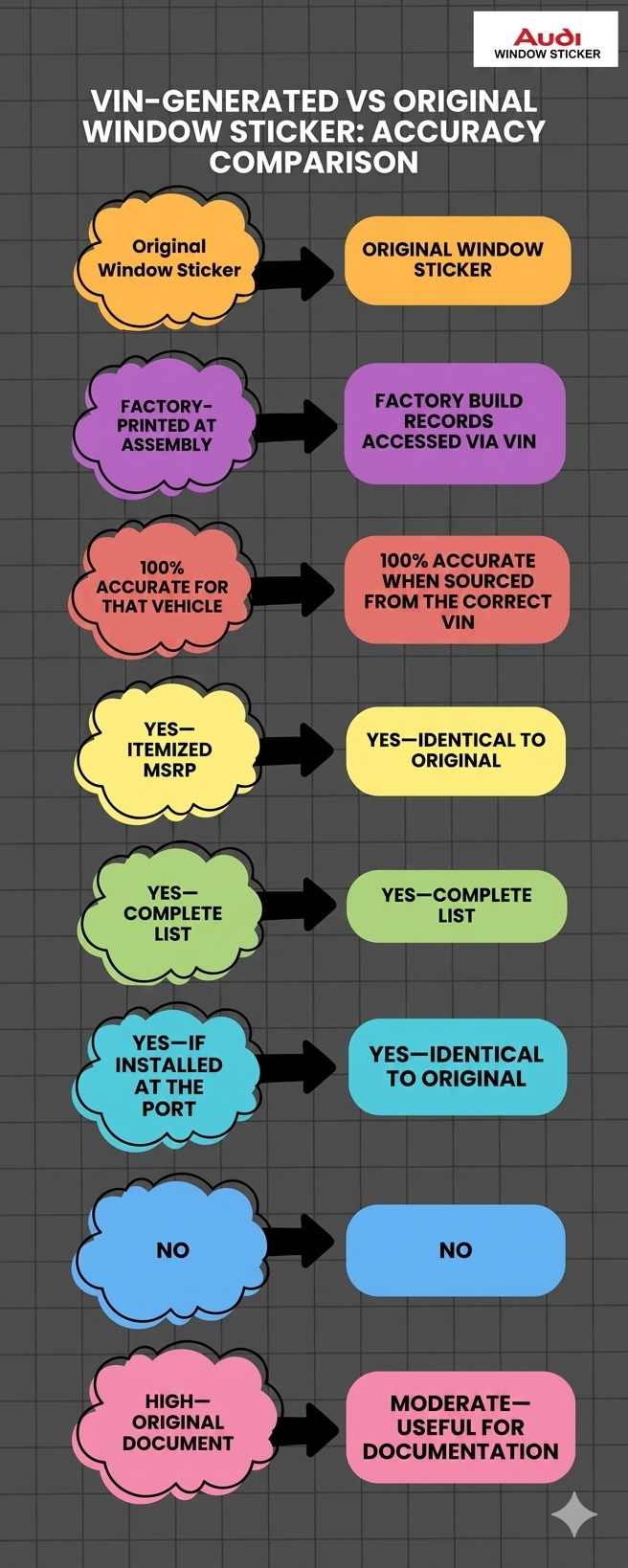
VIN-Generated vs Original Window Sticker: Accuracy Comparison
VIN-generated and original window stickers can look very similar, but there are a few differences in accuracy and reliability. Understanding how they compare helps you know when each option is sufficient and when the original document matters most.
Are They Identical in Content?
When sourced from the manufacturer's factory records, a VIN-generated window sticker contains identical information to the original Monroney label. The difference is physical provenance, not data accuracy.
For practical purposes—verifying factory options, confirming MSRP, or documenting a vehicle for resale—the information is equally authoritative.
Factors That Affect Accuracy
The accuracy of the VIN-generated window sticker depends on several factors, especially on the quality of the data source and how the information is processed.
Service Provider Reputation
Not all VIN-based window sticker services are created equal. Accuracy depends on:
| Factor | Impact on Accuracy |
|---|---|
| Direct Manufacturer Data Access | Highest accuracy |
| Third-Party Aggregated Data | May have gaps or errors |
| User-Submitted Data | Unreliable |
| VIN Validation | Prevents entry errors |
| Database Coverage | Affects availability for older or rare models |
← Scroll horizontally to see more →
Vehicle Age
Sadly, not all window stickers by VIN services can get you the complete window sticker. However, our service can be used to decode VINs from 1981.
| Vehicle Age | Accuracy Considerations |
|---|---|
| 1981–Present | Standardized 17-character VIN; factory records are typically digitized and accessible |
| Pre-1981 | Non-standardized VIN formats; records may not be digitized or available |
| Classic/Vintage | May require specialized documentation services |
← Scroll horizontally to see more →
Market Specification
Market specifications refer to the region or country a vehicle was originally built for. This can affect features, safety standards, and equipment, which may influence the accuracy of VIN-generated window stickers.
| Market | Accuracy |
|---|---|
| US/Canada | Fully supported; factory records accessible |
| Other Markets | Varies by service and manufacturer |
← Scroll horizontally to see more →
Common Use Cases and Accuracy Expectations
VIN-generated window stickers are commonly used for verification, resale listings, and general research. While they are usually accurate for core details, expectations should vary depending on data availability and the level of detail required.
Use Case 1: Verifying Factory Options Before Purchase
Scenario: You are considering buying a used Audi and want to confirm it has the Prestige Package, S line Sport Package, and Bang & Olufsen sound system.
Accuracy Expectation: Highly Accurate
- A VIN-generated window sticker from factory records will show every factory-installed package and option.
- If an option is listed, it was installed at the factory.
- If an option is not listed, it was not factory-installed.
Red Flag: If the seller claims an option that does not appear on the generated sticker, it was either:
- Added aftermarket (not factory)
- Misrepresented
Use Case 2: Determining Original MSRP for Insurance or Financing
Scenario: You need to document your Audi’s original value for an agreed-value insurance policy or loan application.
Accuracy Expectation: Highly Accurate
- The MSRP, including base price, option costs, and destination charge, is pulled directly from factory records.
- This matches what the vehicle cost when new.
Use Case 3: Documenting a Vehicle for Resale
Scenario: You are selling your Audi and want to provide the original factory specifications to build buyer confidence.
Accuracy Expectation: Highly Accurate
- A VIN-generated window sticker provides the same factory information as the original.
- Buyers can verify the trim level, packages, and options independently.
Use Case 4: Restoring a Classic Audi
Scenario: You are restoring a 1990s Audi and need to confirm original paint color, interior trim, and optional equipment.
Accuracy Expectation: Varies by Vehicle Age
- For 1981–present models, factory records are typically accessible.
- For pre-1981 models, records may not be digitized.
- Some rare or limited-production models may have incomplete records.
Use Case 5: Settling an Insurance Total Loss Claim
Scenario: Your Audi was totaled, and you need to prove its original value and options to the insurance company.
Accuracy Expectation: Highly Accurate for Factory Data
- The window sticker documents original MSRP and factory options.
- Insurance companies typically accept VIN-generated window stickers as supporting documentation.
- Combined with vehicle history reports and service records, this strengthens your claim.
How to Verify the Accuracy of Your Generated Window Sticker
To confirm accuracy, compare the generated sticker with the vehicle itself and any available documents. Cross-check features, options, and pricing details, and verify key information with a dealership or trusted data source when needed.
Step 1: Double-Check the VIN
Ensure the VIN entered matches:
- The dashboard VIN (visible through the windshield).
- The driver’s side door jamb sticker.
- Your vehicle registration or insurance card.
Step 2: Cross-Reference Visible Features
Compare the generated sticker’s option list with the actual vehicle:
| Feature to Check | Where to Verify |
|---|---|
| Trim Level Badging | Rear of vehicle (e.g., Premium, Premium Plus, Prestige) |
| S line Badging | Front fenders, grille, steering wheel |
| Bang & Olufsen Speakers | Speaker grilles with aluminum covers |
| Panoramic Sunroof | Roof—visible from inside and outside |
| Adaptive Air Suspension | Suspension settings in MMI |
| Sport Differential | RS/S models with the sport diff option |
| Wheels | Compare to factory wheel designs |
← Scroll horizontally to see more →
Step 3: Check the Spare Tire Well Sticker
Many Audis have a sticker in the spare tire well listing PR codes (three-digit option codes). Compare these codes to known option codes:
- 9VS = Bang & Olufsen Sound System
- 2MC = Adaptive Air Suspension
- GH2 = Sport Differential
FAQs About Window Sticker by VIN Accuracy
How accurate are window stickers generated from VINs?
When generated from manufacturer factory records, VIN-based window stickers are 100% accurate for factory-installed information, including MSRP, optional equipment, packages, standard features, and fuel economy. The data matches exactly what appeared on the original Monroney label.
Can I trust a VIN-generated window sticker for verifying factory options?
Yes. If the service accesses Audi’s factory build records, the option list is authoritative. Any factory-installed package or option installed at the factory will appear on the generated sticker.
What information might be missing from a VIN-generated window sticker?
VIN-generated window stickers do not include:
- Dealer-installed accessories (added after factory delivery).
- Aftermarket modifications.
- Service history or accident history.
- Current mileage or ownership records.
These require separate documentation, like vehicle history reports or service records.
Are VIN-generated window stickers accepted by insurance companies?
Yes. Most insurance companies accept VIN-generated window stickers as documentation of original MSRP and factory options for:
- Agreed-value policy applications
- Total loss claim settlements
- Vehicle valuation disputes
Can a VIN-generated window sticker be wrong?
Accuracy depends on the data source. Services that access direct manufacturer factory records are highly accurate. Services that rely on aggregated or user-submitted data may have errors. Always choose reputable services like the Audi window sticker that specify their data sources.
Why does my VIN not return a window sticker?
Common reasons include:
- VIN entry error: Double-check the VIN from multiple locations
- Pre-1981 vehicle: Non-standardized VIN format
- Incomplete records: Rare or limited-production models may have gaps
Is a VIN-generated window sticker the same as a VIN decoder?
No. A VIN decoder interprets the VIN itself to provide basic specifications. A VIN-generated window sticker accesses factory build records to provide detailed pricing, options, and equipment. The window sticker contains significantly more information.
How do I know if a window sticker service is accurate?
Look for services that:
- Offer VIN validation before generating.
- Provide samples or examples of their output.
- Have positive reviews from users.
- Offer customer support for issues.
Can I get a VIN-generated window sticker for a leased Audi?
Yes. The VIN is the same regardless of ownership status. A leased Audi’s window sticker can be generated just like a purchased vehicle. This is useful for verifying options before lease return or documenting the vehicle’s original value.
What’s the difference between a build sheet and a VIN-generated window sticker?
A build sheet (or PR code sticker) lists three-digit option codes for every component. A VIN-generated window sticker presents factory options in a consumer-friendly format with pricing and descriptions. The build sheet is more technical; the window sticker is more accessible for buyers and sellers.
Do VIN-generated window stickers show port-installed accessories?
Yes. Port-installed accessories—items added at the port of entry before the vehicle reaches the dealership—are part of the factory build records and will appear on the window sticker. Examples include all-weather floor mats, carbon fiber mirror caps, and roof rack crossbars.
How far back do VIN-generated window stickers go?
Most services support vehicles from 1981 to the present, when the standardized 17-character VIN format became mandatory in the United States. Pre-1981 vehicles used non-standardized formats and may not be supported.